This browser-based tool merges text and image inputs with editable illustrations and publicly available tutorials, serving inventors, patent experts, and product teams.
PatentFig AI draws attention to its browser-based approach for generating and reviewing patent illustrations, backed by a public collection of 27 annotated samples and a video walkthrough. The software integrates text descriptions, rough sketches, and reference pictures into a single workspace, enabling inventors, patent professionals, and product teams to craft drawings and polish them prior to submission.
Creating technical drawings typically requires converting an invention’s description into multiple visual representations. A tangible product might demand perspective, cross-section, and exploded views; a software-based invention could call for a flowchart or system block diagram. PatentFig AI supplies capabilities for handling these various illustration types within a unified interface.
Also worth a look: Amba Data Shows Senior Living Communities Can Dramatically Reduce Falls with Earlier Insight and Techcyte Launches Microsoft Teams Meetings from Fusion AP.
Users may start from a written description or an existing visual reference, produce a first draft of a figure, and then modify it through plain-language commands. The system accommodates line art, multi-view drawings, flowcharts, and block diagrams. Features for project organization and version control help users maintain coherent sets of related illustrations while reviewing and updating the invention’s visual depiction.
Samples pair visual references with an initial prompt
The publicly accessible patent drawing examples library organizes 27 samples into eight categories: utility, design, mechanical, electrical and circuit drawings, software flowcharts and process diagrams, block diagrams, medical device drawings, and exploded views and cross-sections. Featured examples pair source images with the final figure, demonstrating how a visual reference gets transformed into line art.
Every sample depicts a hypothetical invention. Site visitors can pick a relevant example and launch the generator with an appropriate prompt, then tailor that initial setup to their own needs. The included descriptions explain the role of each figure category and factors like choosing views, adding reference numbers, and line styling.
A process that incorporates editing and verification
In addition to figure creation, PatentFig AI offers specialized tools for figure validation, image format conversion, vectorization, and resolution improvement. These utilities aid in the preparation and examination workflow; users retain responsibility for verifying technical correctness and the standards relevant to their intended submission.
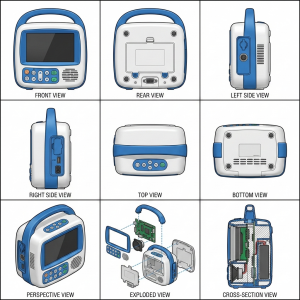
The visual that accompanies this release originates from PatentFig AI's public demo project. It displays several rendered perspectives of a hypothetical portable monitor, showcasing various approaches to convey a product's outer appearance and internal component layout.
The official video guide goes through the platform's product, logic, and image tools. Combined, the tutorial and sample library provide potential users with an opportunity to explore the workflow prior to launching their own project.
PatentFig AI is accessible via the web. Users can navigate the platform, examine its existing pricing options, and view the public examples at patentfig.ai.
Introduction to PatentFig AI
PatentFig AI is an AI-driven patent illustration platform designed for inventors, patent practitioners, and product teams. It assists users in producing and modifying patent drawings from textual descriptions, sketches, and reference pictures, covering line art, multi-views, flowcharts, and block diagrams.
Davie Chen
PatentFig AI
contact@patentfig.ai
Follow us on social platforms:
YouTube
Creating Patent Drawings with PatentFig AI | Product, Logic, and Image Tools Walkthrough